
Direct answer
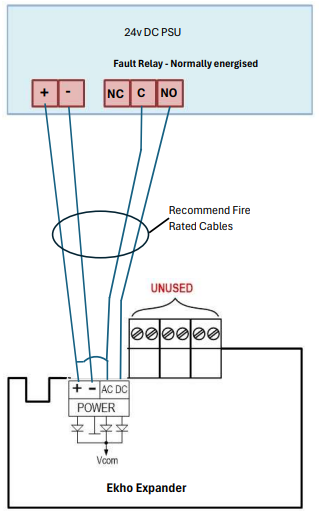
The EK-WL8-EXP reports a power failure when the supply it monitors on its AC/DC inputs is missing or too low. Feed the external power supply (PSU) into those inputs through the normally closed (NC) contact of the supply’s fault relay, or connect them directly to its open collector outputs; enable power supply monitoring for the expander, from the EK-WL8-TRH menu or from the Ekho Configuration software; and use a supply that meets BS EN 54-4 with an output current limit of 8 A. If the inputs are not connected correctly, a fault is displayed on the EK-WL8-TRH translator and on the panel to which the translator is connected.
Applies to
- Products / Models: EK-WL8-EXP (Ekho wireless expander), EK-WL8-TRH (Ekho translator)
- Firmware / Version: All versions
- Region: Not applicable
- Standards: BS EN 54-18, BS EN 54-25 (expander); BS EN 54-4 (external power supply)
Symptoms
- The “PW” LED on the EK-WL8-EXP shows yellow instead of green.
- The EK-WL8-TRH translator, and the panel connected to it, report a main or backup power supply fault for the expander.
Likely causes
- Power monitoring is enabled, but the AC/DC inputs are not fed through the power supply’s fault relay or open collector outputs, so no monitored voltage is present.
- The voltage between “-” and one of the AC/DC inputs has dropped below 10.5 V.
- The external power supply has itself failed, or does not provide the 8 A output current limit and EN 54-4 conformity required by the installation instructions.
Resolution
- Enable power supply monitoring for the expander, either from the EK-WL8-TRH menu (Main power monitor and Backup power monitor modes set to ON) or from the Ekho Configuration software (expander properties, 2. Control circuits: Primary supply monitoring and Secondary power supply monitoring). The AC and DC inputs are monitored only while these modes are enabled, and monitoring can be disabled again from the same place.
- Confirm that the external power supply has an output current limit of 8 A and meets the requirements of BS EN 54-4, as required by the EK-WL8-EXP installation instructions.
- Wire the supply to the AC/DC inputs of the EK-WL8-EXP through the normally closed (NC) contact of the supply’s fault relay, so that the contact opens and removes the monitored supply when the power supply signals a fault. The inputs can alternatively be connected directly to open collector outputs on the power supply.
- Check that the voltage between “-” and each AC/DC input stays above 10.5 V in normal operation; the expander generates a fault event when it drops below that level.
- Verify the result: the “PW” LED returns to green and the fault clears at the EK-WL8-TRH and at the panel.
When to contact technical support
Contact Hochiki Europe technical support if the fault persists after the AC/DC inputs have been wired through the power supply fault relay and power monitoring has been enabled, if the voltage between “-” and an AC/DC input stays below 10.5 V while the supply is healthy, or if you have not completed Ekho training. Formal training is required to design, install and commission Ekho systems.
Safety note
This article is general guidance for Hochiki Europe products. Design, installation, commissioning, maintenance and modification of fire detection and alarm systems should be carried out by, or under the responsibility of, a competent person in accordance with the applicable standards (for example BS 5839-1 in the UK). Statutory requirements imposed by the relevant enforcing authority also apply. Always refer to the current product manual and data sheet for the exact model before carrying out any work.
References
- EK-WL8-EXP Wireless Expander Module installation manual (STFV.425551.030-E-UM, rev. 30)
- EK-WL8-EXP Wireless Expander Module specification (ISS2)
- EK-WL8-TRH Wireless Translator Module installation manual (STFV.425551.070-E-UM, rev. 15)
- Application Note 189 — Installing Hybrid Wireless Manual Call Points onto a Wired System (AP189, Issue 1)
- BS EN 54-4 — Fire detection and fire alarm systems: Power supply equipment
- Why do Ekho devices not communicate with another translator, and how should I troubleshoot each translator?
Last reviewed: 2026-10-13 — Reviewed by: Hochiki Europe Technical Support